
PyTorch toolbox to work with spherical surfaces.
Note
This page is a reference documentation. It only explains the class signature, and not how to use it. Please refer to the gallery for the big picture.
-
class
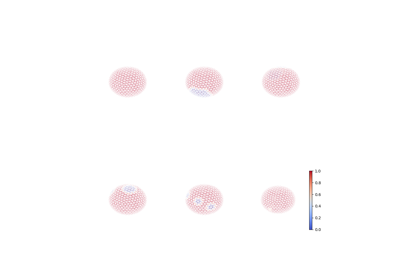
surfify.augmentation.SphericalRandomCut(vertices, triangles, neighs=None, patch_size=3, n_patches=1, replacement_value=0)[source]¶ Random cut of patches on the icosahedron: use Direct Neighbors (DiNe) to build patches.
See also
neighborsExamples
>>> from surfify.utils import icosahedron
>>> from surfify.datasets import make_classification
>>> from surfify.augmentation import SphericalRandomCut
>>> import matplotlib.pyplot as plt
>>> from surfify.plotting import plot_trisurf
>>> ico3_verts, ico3_tris = icosahedron(order=3)
>>> X, y = make_classification(ico3_verts, n_samples=1, n_classes=3,
                               scale=1, seed=42)
>>> processor = SphericalRandomCut(
        ico3_verts, ico3_tris, replacement_value=5)
>>> y_cut = processor(y)
>>> plot_trisurf(ico3_verts, triangles=ico3_tris, texture=y_cut,
                 is_label=True)
>>> plt.show()
-
__init__(vertices, triangles, neighs=None, patch_size=3, n_patches=1, replacement_value=0)[source]¶ Init class.
- Parameters
vertices : array (N, 3)
icosahedron’s vertices.
triangles : array (M, 3)
icosahdron’s triangles.
neighs : dict, default None
optionnaly specify the DiNe neighboors of each vertex as build with sufify.utils.neighbors, ie. a dictionary with vertices row index as keys and a dictionary of neighbors vertices row indexes organized by rings as values.
n_rings : int, default 3
the number of neighboring rings from one node to be considered during the ablation.
n_patches : int, default 1
the number of patches to be considered.
replacement_value : float, default 0
the replacement patch value.
-
Follow us